MCP Model Context Protocol Guide: Connect AI to Your Data
Artificial intelligence has changed how we work, but most AI assistants operate in isolation. They cannot access your files, databases, or tools unless you manually copy and paste information. The MCP model context protocol guide solves this problem by creating a standard way for AI systems to connect with external data sources securely and efficiently.
Anthropic introduced the Model Context Protocol as an open standard in late 2024. Since then, developers and businesses have adopted it to bridge the gap between AI capabilities and real-world data. This guide explains what MCP is, why it matters, and how you can start using it today.
What Is the Model Context Protocol?
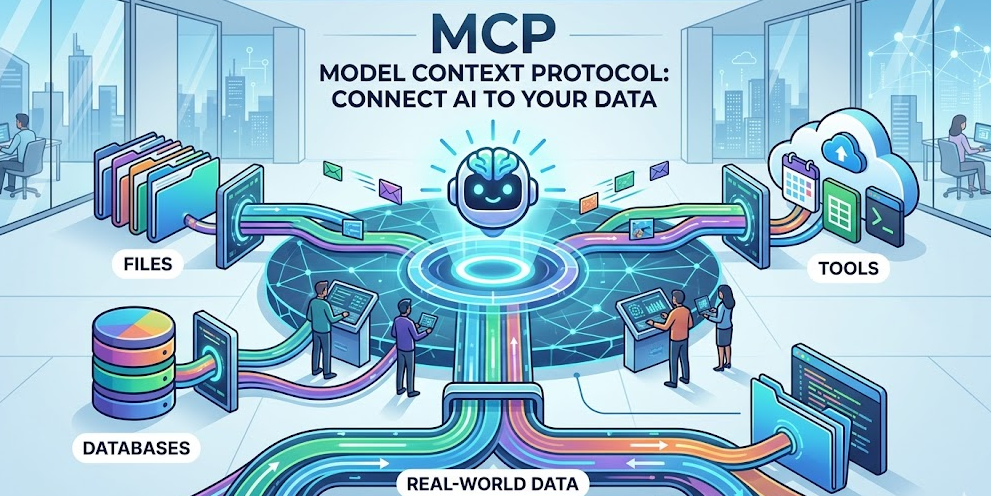
The Model Context Protocol is an open standard that enables AI assistants to connect to external data sources and tools through a unified interface. Think of it as a universal adapter that allows AI systems to plug into your existing infrastructure without custom integrations for each service.
Before MCP, connecting an AI assistant to your data required building custom APIs for each integration. You needed separate code for Slack, separate code for your database, and separate code for your file system. MCP eliminates this fragmentation by providing one protocol that works everywhere.
The protocol works through MCP servers, lightweight programs that expose your data through a standardized interface. These servers handle authentication, data formatting, and security so your AI assistant can focus on understanding and using the information.
Why MCP Model Context Protocol Matters
Understanding why MCP model context protocol guide content is trending requires looking at the current limitations of AI assistants. Most large language models work with static training data or require complex API integrations to access live information. This creates friction and limits what AI can accomplish.
MCP addresses three critical problems:
Security Without Complexity
Traditional AI integrations often require sharing sensitive credentials with third-party services. MCP servers run locally or within your infrastructure, keeping your data under your control. You decide what the AI can access and how it can use that information.
Universal Compatibility
Once you build an MCP server for a data source, any MCP-compatible AI assistant can use it. This means your integration work benefits multiple tools instead of locking you into a single vendor. Claude, Cursor, and other AI assistants can all connect through the same server.
Real-Time Data Access
Static training data becomes outdated quickly. MCP enables AI assistants to query live databases, read current files, and interact with real-time APIs. Your AI responses reflect the current state of your business rather than historical snapshots.
How MCP Servers Work
An MCP server acts as a translator between your data and AI assistants. When an AI needs information, it sends a request through the MCP protocol. The server receives this request, retrieves the appropriate data from your systems, and returns it in a format the AI understands.
The architecture follows a simple client-server model:
The MCP client runs inside your AI assistant application. This client understands the protocol and knows how to communicate with servers. When you ask a question that requires external data, the client identifies which MCP server can provide the answer.
The MCP server connects to your actual data sources. This might be a PostgreSQL database, a GitHub repository, a Slack workspace, or custom business applications. The server handles authentication, query translation, and data formatting.
The protocol itself defines standard methods for listing available resources, reading data, and executing actions. This standardization means any MCP client can work with any MCP server without custom configuration.
Building Your First MCP Server
Creating an MCP server is straightforward for anyone with basic programming knowledge. The official SDK provides templates and libraries that handle protocol details so you can focus on your data logic.
Here is the basic structure of an MCP server:
Define Your Resources
Start by identifying what data you want to expose. This could be database tables, API endpoints, file directories, or business logic functions. Each resource becomes available to AI assistants through the MCP protocol.
Implement Resource Handlers
Write functions that fetch and format your data. These handlers receive requests from AI assistants and return structured responses. The MCP SDK handles protocol communication automatically.
Configure Authentication
Determine how your server will authenticate requests. Options include local-only access, API keys, OAuth tokens, or enterprise single sign-on. The choice depends on your security requirements and deployment environment.
Test With MCP Clients
Before deploying, test your server using MCP-compatible tools. Claude Desktop, Cursor, and other applications support MCP connections. Verify that your data appears correctly and that the AI can interpret it accurately.
MCP Model Context Protocol Use Cases
Organizations implement MCP model context protocol guide recommendations for various practical applications. These real-world scenarios demonstrate the protocol’s versatility.
Database Querying
Business analysts connect AI assistants directly to company databases through MCP servers. Instead of writing SQL queries manually, they ask natural language questions like “What were our top-selling products last quarter?” The MCP server translates these questions into database queries and returns formatted results.
Code Repository Analysis
Development teams use MCP to let AI assistants analyze their entire codebase. The AI can reference specific files, understand project structure, and suggest improvements based on the actual code rather than general programming knowledge. This context-aware assistance produces more relevant recommendations.
Document Management
Legal firms and research organizations connect AI to their document repositories. Lawyers can ask questions about case files, contracts, and precedents without manually searching through folders. The AI understands document contents and relationships, providing comprehensive answers grounded in actual files.
Workflow Automation
Operations teams build MCP servers that connect AI assistants to business tools like Slack, Jira, and Salesforce. The AI can check ticket status, update records, and trigger workflows through natural language commands. This integration layer reduces context switching between applications.
MCP vs Traditional API Integration
Comparing MCP model context protocol guide approaches with traditional integration methods highlights significant advantages.
Traditional API integration requires custom code for each connection. Your developers must learn different authentication methods, data formats, and endpoint structures for every service. This complexity multiplies with each new integration.
MCP standardizes these interactions. Once developers understand the protocol, they can build integrations faster and maintain them more easily. The learning curve is steeper initially but pays dividends as your integration ecosystem grows.
Security also differs between approaches. Traditional integrations often scatter credentials across multiple services and codebases. MCP centralizes authentication within your infrastructure, making security audits and compliance easier to manage.
Best Practices for MCP Implementation
Successful MCP deployments follow established patterns that maximize security and utility.
Start With Read-Only Access
When deploying your first MCP server, begin with read-only permissions. This lets you test AI assistant interactions without risking accidental data modifications. Once you understand the behavior patterns, gradually introduce write capabilities.
Implement Comprehensive Logging
Track which AI assistants access what data and when. This audit trail helps with security monitoring and debugging. Many organizations find unexpected usage patterns that reveal opportunities for additional MCP resources.
Document Your Resources
Clear documentation helps AI assistants use your MCP servers effectively. Describe what each resource contains, how data is structured, and what queries work best. Well-documented resources produce more accurate AI responses.
Monitor Performance
MCP servers can become bottlenecks if not optimized. Monitor query response times and server resource usage. Caching frequently accessed data and optimizing database queries improves the AI assistant experience significantly.
The Future of MCP and AI Integration
The Model Context Protocol represents a fundamental shift in how we think about AI assistant capabilities. As the protocol matures, we expect several developments.
Expanded Tool Ecosystem
More vendors are adopting MCP for their products. This growing ecosystem means AI assistants will connect to an increasing variety of business tools without custom development. The network effect benefits everyone in the ecosystem.
Improved Security Standards
Enterprise adoption drives enhanced security features. Future MCP versions will likely include fine-grained permission controls, audit enhancements, and compliance certifications. These improvements make MCP suitable for highly regulated industries.
Standardized Discovery
Current MCP implementations require manual server configuration. Future protocols may include automatic discovery mechanisms where AI assistants find and connect to relevant MCP servers within your infrastructure. This automation reduces setup friction significantly.
Frequently Asked Questions
No, MCP is an open protocol that any AI assistant can implement. While Anthropic created and promotes the standard, Cursor and other applications already support MCP connections. The open nature ensures vendor independence.
Using existing MCP servers requires minimal technical knowledge. Installing and configuring pre-built servers is straightforward. Building custom servers requires programming skills, but the SDK makes this accessible to developers with basic experience.
MCP can theoretically connect to any data source that supports programmatic access. Databases, APIs, file systems, and cloud services all work with MCP. The limitation is usually your ability to write the server code, not the protocol itself.
Security depends on your server implementation. MCP servers run under your control, so you determine authentication requirements and access permissions. Running servers locally keeps sensitive data within your infrastructure rather than sending it to external services.
The official SDK supports TypeScript and Python. Community implementations exist for other languages including Go, Rust, and Ruby. The protocol itself is language-agnostic, so you can implement servers in any language that handles JSON-RPC.
Conclusion
The MCP model context protocol guide approach transforms how businesses integrate AI assistants with their data. By providing a standardized, secure method for AI systems to access external information, MCP eliminates the integration complexity that previously limited AI adoption.
Starting with MCP requires understanding your data sources, building or configuring appropriate servers, and testing with MCP-compatible AI assistants. The investment pays off through more capable AI assistants that understand your specific business context.
Begin your MCP journey by identifying one data source that would benefit from AI integration. Build a simple read-only MCP server for that source, test it with Claude or another compatible assistant, and iterate based on what you learn. This practical approach builds expertise while delivering immediate value.
As the MCP ecosystem grows, early adopters gain competitive advantages through more intelligent, context-aware AI systems. The protocol is not just a technical standard. It represents a new way of thinking about AI capabilities that puts your data at the center of the experience.